Saturday, November 9, 2013

Digital Video Recorder Features


High Speed IT Network Services LLC helps you in  installing a digital video recorder (or DVR) server that allows you to save space and time. Other recording servers require several different pieces of equipment in order to get the results you will get from a single DVR server. This combination device replaces the time-lapse VCRs, the multiplexer that allows multiple signal inputs and the video server necessary for remote surveillance. That sounds like a lot of complex equipment, doesn’t it? Imagine getting all of that in one slim, comprehensive unit.

Features:


Digital video recorder servers typically have four, nine, or sixteen security camera inputs, giving you the flexibility to implement whatever camera system suits you best. Other great benefits and features include:

-Remote access at all times
-Better pausing for still images
-Improved storage, especially over long periods of time
-Easy installation
-Clear image copying
-Long recording times                                                                        
-Internal web server
-Picture in picture and zoom
-Hard drive for storage

Fortifying your security system with these servers isn’t just improving the technology behind your security. It’s giving yourself the peace of mind of knowing that should anything happen to your business; you have the utmost capability to identify any perpetrators. You can make as many copies of the recordings you need without losing the image quality.

There is also the option of hooking up your DVR servers to a network in order to allow for viewing through an internet browser. These servers can offer either Ethernet or dial up modem connections. Video and audio can be exported to compatible USB ports as well. Sharing information is never a problem with these specialized DVR devices.

Don’t hesitate to visit http://www.hispeedit.com/ (High Speed IT Network Services LLC.)to discover which video server is best for you. You deserve the most up-to-date security available.


Friday, November 8, 2013

7 Key New Features in iOS 7

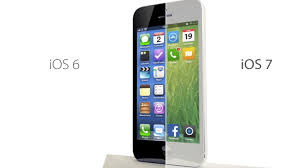
Apple  made a big move recently by launching the highly controversial iOS 7. The near instant feedback from social networks users was less than positive. Although some didn’t mind the new operating system, others passionately disliked it, and some even became physically sick trying to navigate to their favorite apps.

There may be a few nice upgrades, but for the most part many Apple users wonder if the new features are worth the hassle.
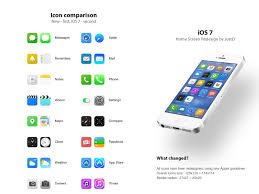
Seven Key New Features in iOS 7

Even with the negative publicity surrounding Apple's iOS 7, there seems to be more promise than initially
predicted as it continues to grow on users with the discovery of new features.


Here are some of the key differences in iOS 7:

1. The Design

The design is the first immediately noticeable difference after the update. Filled with new colors, a smaller
keyboard and new icons, users instantly see a dramatic change in the operating system before feeling the updates.

Then, the user puts the operating system in motion - literally. The new design includes distinct animated
characteristics. For example, the icons appear to be floating on the background. As the user moves the phone around, the background moves with it. Another example of the new animated design is the way apps fly around the screen.
Although they may not seem like a big deal, many people claim that while using the newlydesigned operating system, these small animations make them nauseous.

2. Swipe Down for the Spotlight

In the past, Apple users had to click to a unique page to search their iPhone or iPad for information. iOS 7
changes this by making it easier to swipe down for the search bar. To access, users simply swipe down from the middle of the home screen.
The spotlight feature searches the phone for contacts, emails and apps. It does not, however, search the Internet, as it did in the past.

3. Toggles are Easier to Access

On the last operating system, Apple made it somewhat tricky to toggle to essential functions, such as Airplane
mode, Bluetooth settings, media controls and more. Those used to be hidden deep inside the settings button.

Apple discovered how frequently people used these features and designed an exclusive screen just for them. This is called the Control Panel, which is accessible by swiping up from the home screen. In addition to Airplane mode and Bluetooth, the Control Panel screen allows you to adjust your phone’s brightness, find a Wi-Fi signal, lock the orientation, play music, adjust the speaker and more. It even has a flashlight and calculator.
There are times when this screen is difficult to access. Other times, it may suddenly appear whe navigating an app and accidentally swipe up from the bottom of the screen. To make it less bulky, there are adjustments that can be made in settings.

4. Easier Leveling Abilities


Remember those new motions everyone has complained about? It turns out Apple has used the motion detection abilities to a small advantage.
Apple has built in the ability to use your iPhone or iPad as a level, which is accessed in the compass app. Once in the compass app, swipe to the left and you’ll see the bubble-leveling tool appear. Although not an essential
app, many people have been surprised by its handiness.

5. New Internet Interface

The entire design of Safari in iOS 7 has changed. First, the bottom navigation bar that takes you forward, back and allows you to access your bookmarks is now easier to use. It hides itself when a user is on a Web page to avoid distraction.

What has also changed is the way tabs are viewed. The new scrolling interface allows you to view more open tabs.
There is a small x in the top corner to close out any tabs that are no longer required or used. Sometimes, this
can be tricky to push, so Apple’s new operating system also allows users to close tabs by swiping to the left.
This is much faster and easier for users, allowing them to quickly move about their business.

6. Closing Apps is Easier

Closing apps isn’t a huge necessity, that is, until they crash and refus to resolve themselves. Many people also like to keep their apps closed to save battery life. Whatever the reason, closing apps or switching between open apps has become easier and more straightforward.

To close or switch apps in iOS 7, double click on the home screen to pull up a list of open apps. Scroll from side
to side to see the apps. Click on an app to switch to it. To close it out, swipe it up and off the screen.

7. Siri Got an Upgrade

One of Apple’s most noticeable and loved features just got an upgrade. Siri, Apple’s version of a personal
assistant, now comes with male and female voices.

Siri also has more built-in services. It can now understand a broader range of commands, making it even more useful. Some of the new commands and services Siri can access include Wikipedia and Twitter - two essential tools used regularly by many iPhone users.

Although iOS 7 has received much hype and negative publicity, many users are beginning to settle in and discover new key features that they did not realize they missed in the previous operating system. To make this operating system user friendly, Apple still has a few kinks to work out, but overall, there seems to be more promise than initially predicted.

Thursday, November 7, 2013

Fire Detection & Alarm Systems

Instead of reporting alarms by general location or zones, Intelligent Fire Alarm Controllers (IFC) can identify its specific location and status, saving time and confusion in an emergency. As your business needs change, the modular design of our controllers lets you network additional Fire Alarm Control panels or add new devices as your facility grows. This flexibility means substantial cost savings in your investment. Controllers offers intelligent addressable systems ranging from small single alarm panel systems to complete, networkable solutions for large-scale applications.

Intelligent Fire Alarm Controllers (IFC)  Features:


• fully digital,high-precision protocol,intelligent detectors improve fire protection and reduce maintenance costs
• Network compatible with existing IFC panel installations
• Autoprogram feature provides immediate fire protection in new installations
• Multiple programming options make on-site or off-site programming and editing fast and easy
• Network option supports Intelligent Fire Workstation using wire or fiber
• Seamless integration to the building management system and others using industry standard BACnet and Modbus protocols
• Flash memory eliminates need to change EPROMs
• Built-in Degraded Mode capable of general alarms even if CPU fails
• Automatic detector test
• Detector maintenance alert
• Web Server: Optional web-based device that acts as an HTML server that allows remote
  access to the IFC Network via the Internet or an Intranet. User can view the history of a fire alarm control
  panel (FACP), event status, device properties, and other information based on pre-defined access    permissions.
  All data available is a “snapshot” of the data on the IFC Network at the time the browser requested the
  information.

• Supports up to 636 intelligent, addressable devices
• Supports one to two Signaling Line Circuits (SLC) with up to 159 detectors and 159 modules per loop
• Voice and telephone features available via networked DVC: Eight channels of high quality, digital audio used
  for emergency paging and simultaneous broadcasting of multiple messages; standard or customizable audio files;
  five channels of firefighter telephone; 50- or 75-watt amplifiers  with four outputs per amplifier
• Releasing features: 10 independent  hazards, sophisticated cross zone, delay timer and discharge timers, abort
  (four options), low-pressure CO2 listed
• 800-event capacity in non-volatile memory, plus 200-event alarm-only file
• Powerful Boolean logic equations

Finger Print Scanning


Finger print scanning is a way in which a person can be identified using their finger prints. This is because we all have different prints even the most identical of twins do not have matching fingerprints. Thanks to technology this art, has been employed in fighting crime and organizations can get all the information that they require about a person from the very finger prints especially if they need to increase security in their areas.

A scanner is first used to get the print and identifying it. Identification is done by recording of the unique features of the finger print. To ensure accuracy, a scanner will record up to 20 images of the unique features of the finger prints. After this has been done, the scanners database then goes ahead to give other specifications that can lead to identification of the person. This includes giving a person’s pin number, picture, account and eventually the name.

Tuesday, November 5, 2013

Central Monitoring System

CMS http://www.hispeedit.com/The central monitoring system (CMS) software, also known as central monitoring station, is designed for enterprise sizes surveillance systems.  The systems can connect to an unlimited number or NUUO
surveillance systems and is designed to monitor hundreds or thousands of security cameras and DVRs and NVRs.  This is an ideal solution for video monitoring companies, enterprise commercial application, and enterprice government applications.

Central Monitoring System Software Features
    CMS http://www.hispeedit.com/
  •     High Compatibility - Supports all NVR/DVR based sites, as well as all IP cameras supported by    Main Console
  •     Unlimited Server Solution - There is no limitation for the number of camera and DVR/NVR sites.
  •     Unlimited Matrix Consoles - Each matrix can displays up to 64 concurrent live camera viewing and no limitation for number of NCS matrix console.
  •     Powerful Alarm Management - Intuitive E-Map GUI indicates all devices and real-time alarm altering information. Administrator can take advantage of full alarm management
  •     Remote Configuration - Enables administrator to manage remote DVR/NVR servers.
  •     Supports 30 Alarm types

Monday, November 4, 2013

Dome CCTV Cameras

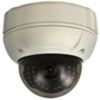
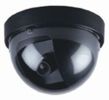
Outdoor Weatherproof Dome CamerasIndoor Dome CCTV CameraDome Security Cameras are named for their dome like shape. Dome cameras are commonly used in Surveillance Systems inside of Casinos, Retail Stores, and Restaurants. This is because dome cameras are more fashionable and blend in very well to their surroundings. Because of their dome shape, it is difficult for someone to tell which direction the lens of a Dome Camera is actually aiming. When shopping for a Dome Camera, you should consider if you need night vision, in which case you should look at an infrared dome camera. If the area that you are installing your camera is susceptible to vandalism or tampering, you should consider installing an vandal dome camera. A varifocal dome camera gives you the flexibility to adjust the focal distance of the camera lens to exactly where you need it. Need help deciding which is best for you, visit http://www.hispeedit.com/

Security Camera Systems


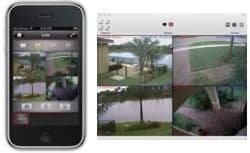
CCTV DVR Viewer AppsThe 4 camera security systems from CCTV Camera are designed to be easy to install and come with everything that you need to have a complete plug and play surveillance system for your home or business. The 4 camera surveillance systems that we most frequently recommend are the packages that include our iDVR which includes free apps and software for remote viewing from Windows PCs, Mac PCs, iPhone, Android, and iPad mobile devices.  All systems come with your choice of security camera type and all systems offers many optional upgrades such as a power supply box, larger hard drives, and LCD monitors. All systems are capable of continuous and/or motion detection recording. Want help designing a system from a sales engineer? visit http://www.hispeedit.com/